Google Apps Script Backend
With Google Apps Script, connecting to the Google Sheets API is child's play. Here, you can create a simple micro-service that can receive & validate content, then update the spreadsheet. This component provides extensibility for more data collection methods.
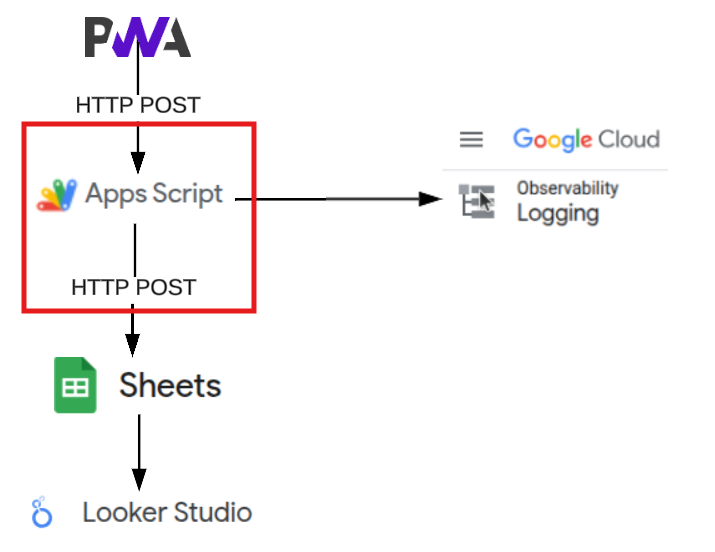
Why Apps Script as a Backend?
- Serverless by Design: Apps Script eliminates infrastructure concerns entirely. Google handles scaling, uptime, and maintenance while you focus on logic.
- Native Google Integration: Direct API access to Sheets, Gmail, Calendar, and Drive without authentication complexity. Your script runs with your Google account permissions.
- Zero Cost Architecture: Free tier provides 6 minutes of execution time per trigger and 20,000 executions daily - more than sufficient for personal analytics.
Implementation
Start a new project
- Go to Apps Script
- Select New Project
Set a Reference for the Google SpreadSheet ID
For personal use, you will set a global SSID within your Script for the spreadsheet. This can be obtained by inspecting the URL of the sheet.
https://docs.google.com/spreadsheets/d/[ssId]
const SSID = "example_1OkGswUREJEt81JKxhTIEowt-Rknp7cLJKDNELFgKTxEQ";
Create The POST Endpoint
function doPost(e) {
  try {
    const data = JSON.parse(e.postData.contents);

    validateData(data);

    // Process and store data
    const result = logTimeEntry(data);

    // Return with CORS headers for downstream apps
    if (result) {
      return ContentService
      .createTextOutput(JSON.stringify({success: true, id: result}))
      .setMimeType(ContentService.MimeType.JSON)
      .setHeaders({
        'Access-Control-Allow-Origin': '*',
        'Access-Control-Allow-Methods': 'POST',
        'Access-Control-Allow-Headers': 'Content-Type'
      });
    }

    throw new Error("No result from logTimeEntry");
  } catch (error) {
    // Return with CORS headers for downstream apps
    return ContentService
      .createTextOutput(JSON.stringify({error: "Processing failed"}))
      .setMimeType(ContentService.MimeType.JSON)
      .setHeaders({
        'Access-Control-Allow-Origin': '*',
        'Access-Control-Allow-Methods': 'POST',
        'Access-Control-Allow-Headers': 'Content-Type'
      });
  }
}
Include Data Validation
function validateData(data) {
    // Validate required fields
    if (!data.date || !data.category || !data.startTime || data.endTime) {
     throw new Error("Missing required fields");
    }
    // validate time
    if (  data.startTime > data.endTime) {
      throw new Error("Start time cannot be after end time");
    }
    if (isNaN(start.getTime())) {
      throw new Error("Invalid start time format");
    }

    if (isNaN(end.getTime())) {
      throw new Error("Invalid end time format");
    }

    // validate date
    if (data.date) {
      entryDate = new Date(data.date);
      if (isNaN(entryDate.getTime())) {
        throw new Error("Invalid date format");
      }
    }
}
Data Processing Logic
function logTimeEntry(data) {
  try{
     var ss = SpreadsheetApp.openById(SSID);
     var sheet = ss.getSheetByName("Sheet1");

     // Get date - Already validated
     // Use what is provided in payload.  If missing, defaults to today's date
     const entryDate = data.date ? new Date(data.date) : new Date();

     // Calculate duration
     const start = new Date(data.startTime);
     const end = new Date(data.endTime || new Date());
     const durationMinutes = Math.round((end - start) / (1000 * 60));
     const durationHours = (durationMinutes / 60).toFixed(2);

     // Prepare row data
     const rowData = [
       entryDate,                 // Date
       start.toTimeString(),      // Start
       end.toTimeString(),        // End
       durationMinutes,           // Duration
       parseFloat(durationHours), // Duration in Hours
       data.category,             // Category
       data.task,                 // Task
       data.client || '',         // use for Client/Context field (may not always be a 'client')
       data.notes || ''           // Notes
     ];

     // Append to sheet
     sheet.appendRow(rowData);

     return sheet.getLastRow();

  } catch (error) {
    console.error('Error in logTimeEntry:', error.message);
    throw error; // throw to be caught by doPost
  }
}
Deployment & Security
Publishing Your API
- Save your script project
- Click “Deploy” → “New Deployment”
- Choose type: “Web app”
- Execute as: “Me”
- Access: “Anyone” (this will be required for external PWA access)
⚠️ Security Note: you many need to authorise this app before it deploys. If you trust yourself as the developer, work through the authorisation wizard to trust the app.
Security Considerations
- Input validation can be extended and prevents malformed data corruption
- Error handling ensures graceful failures
- Google cloud logs can be added to aid debugging and monitoring
- Rate limiting can be added via PropertiesService for abuse prevention
Extensibility Features
- Extend to allow Multiple Data Sources
- Theoretically, this serverless approach can scale from personal use to small team deployments with simple architectural changes
Testing with Curl
Pro Tip: when using curl, include the --verbose flag to see full HTTP response details
Pro Tip: make sure the format of the date, startTime and endTime fields that you send to your google sheet match the format you are using your sheet/looker-studio.
Step 1: Get Your Apps Script URL
After deploying your web app, you’ll have a deployment URL. This should look like:
https://script.google.com/macros/s/[SCRIPT_ID]/exec
Step 2: Basic Test (Valid Data)
With date Provided
curl -X POST \
  -H "Content-Type: application/json" \
  -d '{
    "date": "2025-08-12",
    "startTime": "2025-08-12T09:00:00Z",
    "endTime": "2025-08-12T10:30:00Z",
    "category": "Work",
    "task": "Quick Analytics",
    "client": "Development V2",
    "notes": "Testing the API endpoint"
  }' \
  https://script.google.com/macros/s/[YOUR_SCRIPT_ID]/exec
Without date provided
curl -X POST \
  -H "Content-Type: application/json" \
  -d '{
    "startTime": "2025-08-12T11:00:00Z",
    "endTime": "2025-08-12T11:30:00Z",
    "category": "Work",
    "task": "Quick Analytics",
    "client": "Development V2",
    "notes": "Testing the API endpoint"
  }' \
  https://script.google.com/macros/s/[YOUR_SCRIPT_ID]/exec
Step 3: Test Error Handling
Missing required fields:
curl -X POST \
  -H "Content-Type: application/json" \
  -d '{
    "startTime": "2025-08-12T09:00:00Z"
  }' \
  https://script.google.com/macros/s/[YOUR_SCRIPT_ID]/exec
Invalid date format
curl -X POST \
  -H "Content-Type: application/json" \
  -d '{
    "startTime": "invalid-date"
    "endTime": "2025-08-12T11:30:00Z",
    "category": "Work",
    "task": "Quick Analytics",
    "client": "Development V2",
    "notes": "Testing the API endpoint"
  }' \
  https://script.google.com/macros/s/[YOUR_SCRIPT_ID]/exec

curl -X POST \
  -H "Content-Type: application/json" \
  -d '{
    "startTime": "2025-08-12T11:30:00Z",
    "endTime": "invalid-date"
    "category": "Work",
    "task": "Quick Analytics",
    "client": "Development V2",
    "notes": "Testing the API endpoint"
  }' \
  https://script.google.com/macros/s/[YOUR_SCRIPT_ID]/exec

curl -X POST \
  -H "Content-Type: application/json" \
  -d '{
    "date": "invalid-date",
    "startTime": "2025-08-12T09:00:00Z",
    "endTime": "2025-08-12T10:30:00Z",
    "category": "Work",
    "task": "Quick Analytics",
    "client": "Development V2",
    "notes": "Testing the API endpoint"
  }' \
  https://script.google.com/macros/s/[YOUR_SCRIPT_ID]/exec
Start time after end time:
curl -X POST \
  -H "Content-Type: application/json" \
  -d '{
    "date": "2025-08-12",
    "startTime": "2025-08-12T10:00:00Z",
    "endTime": "2025-08-12T09:00:00Z"
    "category": "Work",
    "task": "Quick Analytics",
    "client": "Development V2",
    "notes": "Testing the API endpoint"
  }' \
  https://script.google.com/macros/s/[YOUR_SCRIPT_ID]/exec